


Overview
The Mailbox Performance Reports provide detailed insights into how your shared mailboxes are performing in Emailgistics. These reports focus on team-level efficiency, measuring how quickly messages are received, replied to, and closed.
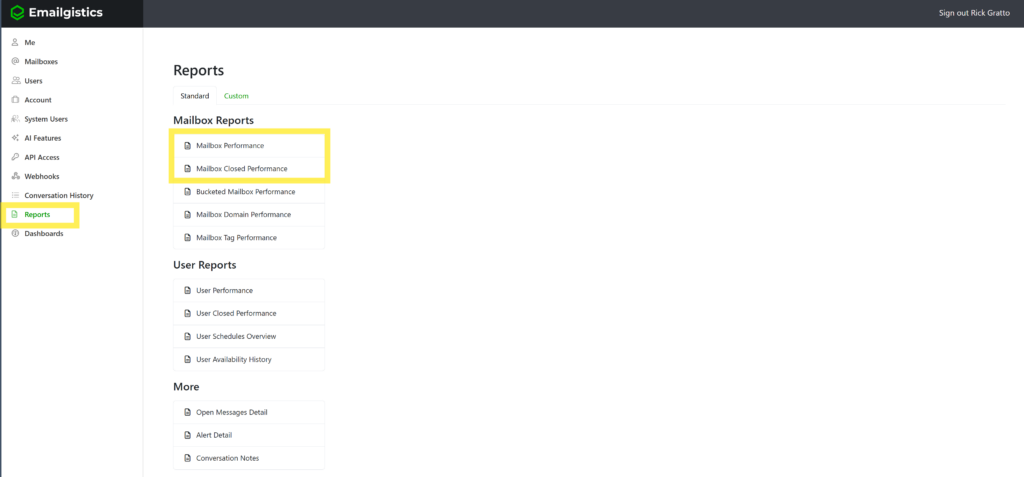
They are separated into two distinct reports:
- Mailbox Performance – focuses on reply activity and responsiveness.
- Mailbox Performance Closed – focuses on how messages are resolved and closed.
Together, these reports give a full picture of team productivity, customer responsiveness, and adherence to SLAs.
Why It Matters
Mailbox performance data helps managers understand how their teams handle customer communication across shared mailboxes.
These insights enable you to:
- Monitor team responsiveness and efficiency.
- Identify workload bottlenecks or recurring slowdowns.
- Track SLA compliance for both replies and resolutions.
- Compare current performance to previous periods for trend analysis.
- Drive accountability and improvement within teams.
Mailbox Performance Report
Purpose
Tracks all reply-related activity within a shared mailbox — visibility into how fast and how often your team responds to customer messages.
Key Metrics
Received
Messages received during the selected period.
Initiated
New outbound messages (not replies).
Initial Replies
First reply sent to an incoming message.
Additional Replies
All subsequent replies after the first.
Total Replies
Initial + Additional replies combined.
Avg Initial Reply Time
Mailbox hours and elapsed time both shown.
Example
A message received Sunday at 9 AM, replied Monday at 8 AM = 1 hr mailbox time, 23 hrs elapsed (assuming Mon–Fri 7 AM–9 PM schedule).
Inside SLA
Displayed only when a reply SLA is active. Shows the number and percentage of initial replies made within the SLA target.
Purpose
Tracks all reply-related activity within a shared mailbox — visibility into how fast and how often your team responds to customer messages.
How to Access
- Log in to the Emailgistics Portal
- Navigate to Reports → Mailbox Performance
- Select mailbox and date range
- Review or export the report
Practical Use Cases
- Identify communication trends.
- Improve team responsiveness.
- Track SLA success.
- Support data-driven coaching.
Mailbox Performance Closed Report
Purpose
Measures how efficiently messages are resolved and closed — insights into completion times and closure methods.
Key Metrics
Received
Total messages received during the reporting period.
Archived
Messages closed by archiving.
Deleted
Messages closed by deleting.
Total Closed
Archived + Deleted (excludes other folder moves).
Avg Close Time
User, mailbox schedule, and elapsed time all shown.
Inside SLA
Displayed only when a close SLA is active. Shows messages closed within SLA and the percentage of total closures that met the target.
Purpose
Tracks all reply-related activity within a shared mailbox — visibility into how fast and how often your team responds to customer messages.
How to Access
- Log in to the Emailgistics Portal
- Navigate to Reports → Mailbox Performance Closed
- Select mailbox and date range
- Review or export the report
Practical Use Cases
- Monitor team efficiency.
- Understand closure behavior (archive vs delete).
- Evaluate workload management.
- Support coaching and goal setting.
If you have any questions or would like some more information on the Emailgistics performance reports, please contact [email protected].